Ready for the full archive?
Unlock the complete library of 78 film stocks, including Kodak Gold 200, Portra 400, and Fuji 400H.


Lightroom Presets
A curated selection of 3 Standard Presets designed to give your photos a quick, clean analog vibe. Perfect for beginners who are just starting to explore Lightroom.
Note: These are standard layer-based presets. For the mathematically accurate "Film Engines" (featuring Halation, Dynamic Grain, and Color Science profiles like Kodak Gold), please check the box under the button below.
Included Profiles
MN Toolkit (Lite)
Your download also includes a "Lite" version of our utility belt.
Want more control? The full 12-tool Chemistry Set is available in the Master Collection.
Included Files
Digital is linear. Film is chemical. Here is how we bridge the gap.

01. Halide Film Grain
Real film grain lives in the light. We use Luminance Ranges to map texture dynamically, injecting grain into highlights where halides naturally clump, while keeping shadows clean and noise-free.

02. Reciprocity Failure
Digital highlights clip, but film rolls off. We emulated the chemical highlight roll-off, gently compressing bright highlights to retain creamy details in clouds and wedding dresses that digital sensors usually destroy.

03. Spectral Skin Tones
Digital often renders skin as flat orange. We reverse-engineered the Spectral Response of film to separate subtle pinks and yellows, creating complexions that look breathable and human, not processed.

04. Emulsion Density
Digital blacks feel empty while film feels "thick." Our 3D LUTs add Subtractive Density to the shadows without crushing detail, giving your images the heavy, cinematic gravity of a darkroom print.
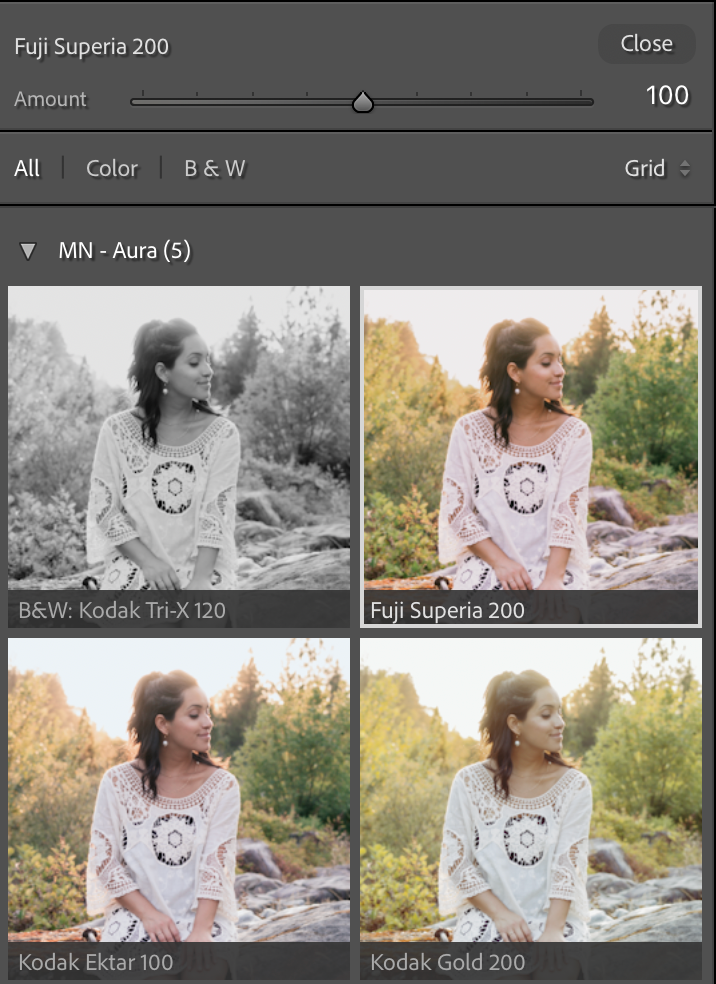

Most presets simply push your basic adjustments around, limiting your ability to edit. Modern Negative uses deep-level 3D Look Tables (LUTs) to remap color science at the sensor level, giving you a foundation that sliders alone cannot achieve.

Unlock the complete library of 78 film stocks, including Kodak Gold 200, Portra 400, and Fuji 400H.
Standard presets just move your Basic Panel sliders, restricting your ability to edit. Modern Negative uses Profiles, which sit underneath your settings via 3D LUTs. This gives you the film look while keeping all your sliders at zero, allowing you to fine-tune exposure and white balance without "breaking" the edit.
Yes. Because our profiles are calibrated using Adobe Standard, they are universally compatible. They work beautifully on high-end mirrorless cameras (Sony, Canon, Fuji, Nikon) and are fantastic for giving iPhone or standard mobile photos an editorial look.
Yes. To utilize the advanced 3D LUT technology and color science of Modern Negative, you need a Creative Cloud subscription. Our profiles are designed to be installed on Lightroom Desktop and automatically synced to your mobile devices via the Adobe Cloud ecosystem.
Every pack comes with our utility belt of workflow tools. This allows you to independently control Grain, Lens Corrections, and Contrast Curves separately from the color grade, giving you total control over the final aesthetic.
Yes. While RAW files offer the most flexibility for color grading, our profiles are designed to handle JPEG and HEIC (iPhone) files gracefully, adding film texture and tone without degrading the image quality.
It’s easy. Your download comes with a step-by-step PDF. If you use Lightroom CC (Cloud), you can install them on your computer and they will automatically sync to your phone. Or follow our install guide here.
We stand behind our work. If the profiles don't work for your workflow, email support within 48 Hours. We will look at your photo files and help you dial them in. If we can't get you the result you want, we will issue a full refund. Read more here.